child seat TESLA MODEL X 2018 User Guide
[x] Cancel search | Manufacturer: TESLA, Model Year: 2018, Model line: MODEL X, Model: TESLA MODEL X 2018Pages: 213, PDF Size: 5.37 MB
Page 37 of 213
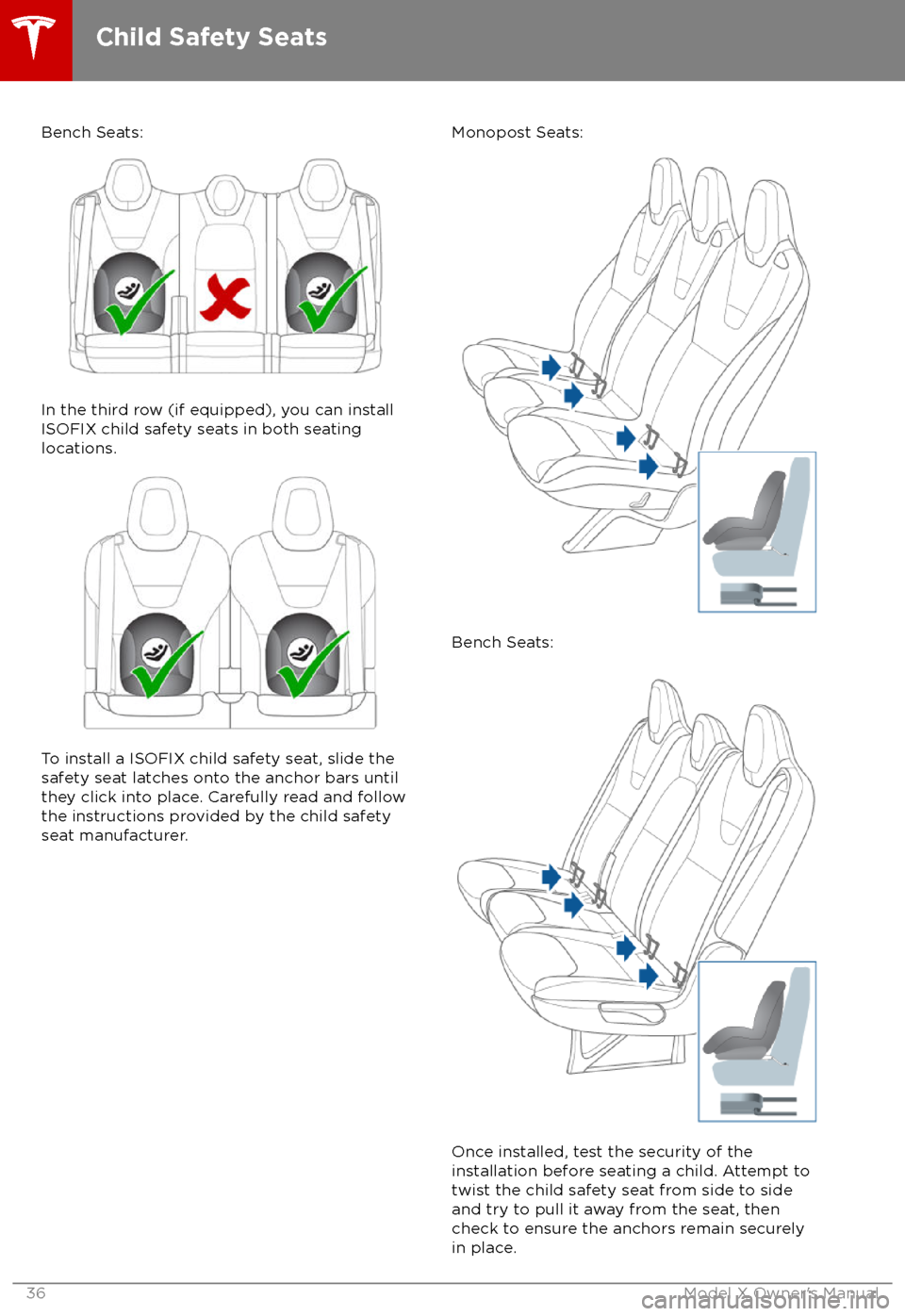
Bench Seats:
In the third row (if equipped), you can install
ISOFIX child safety seats in both seating
locations.
To install a ISOFIX child safety seat, slide the
safety seat latches onto the anchor bars until
they click into place. Carefully read and follow
the instructions provided by the child safety
seat manufacturer.
Monopost Seats:
Bench Seats:
Once installed, test the security of the installation before seating a child. Attempt to twist the child safety seat from side to side
and try to pull it away from the seat, then
check to ensure the anchors remain securely
in place.
Child Safety Seats
36Model X Owner
Page 38 of 213

Note: Lower LATCH anchors should not be
used with child seats or booster seats that
have an integrated safety belt in situations
where the combined weight of the child plus
the child restraint is more than 65 lbs (29 kg). In these situations, use the safety belt instead.
Attaching Upper Tether Straps If an upper tether strap is provided, attach its
hook to the anchor point located on the back of the second and third row seats.
Note: The location of anchor points may not
be readily visible but can be found by
identifying a slice in the seat
Page 39 of 213

For single-strap tethers, position the strap in
the outboard seating positions over the outside-facing side of the head restraint (i.e.
same side of the head restraint as the seat belt
retraction mechanism). In the center seating
position (if equipped), center and position the
strap over the top of the head restraint.
Single Strap - Second Row Monopost Seats:
Single Strap - Second Row Bench Seats:
Child Safety Seats
38Model X Owner
Page 40 of 213
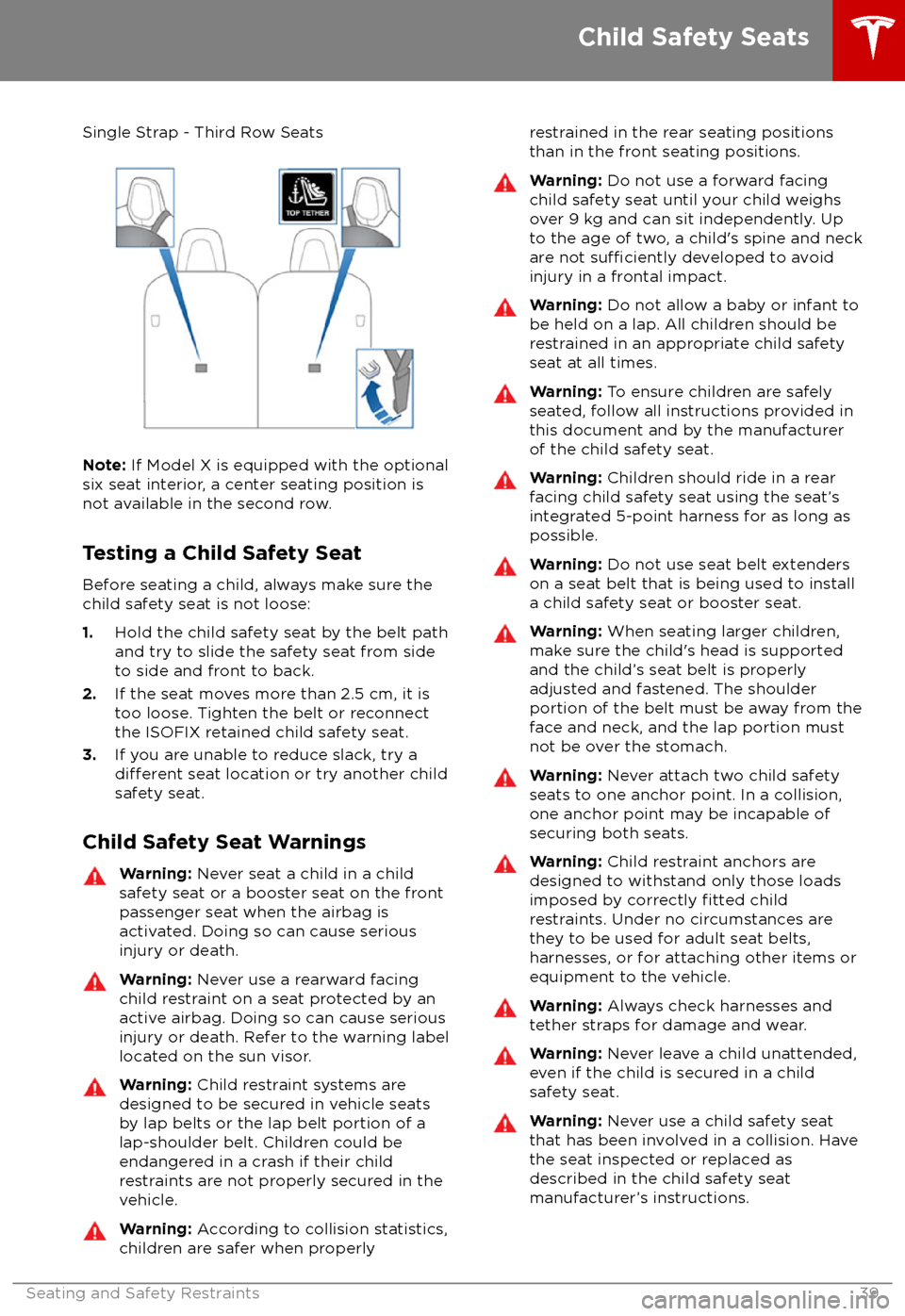
Single Strap - Third Row Seats
Note: If Model X is equipped with the optional
six seat interior, a center seating position is
not available in the second row.
Testing a Child Safety Seat Before seating a child, always make sure the
child safety seat is not loose:
1. Hold the child safety seat by the belt path
and try to slide the safety seat from side
to side and front to back.
2. If the seat moves more than 2.5 cm, it is
too loose. Tighten the belt or reconnect
the ISOFIX retained child safety seat.
3. If you are unable to reduce slack, try a
different seat location or try another child
safety seat.
Child Safety Seat Warnings
Warning: Never seat a child in a child
safety seat or a booster seat on the front
passenger seat when the airbag is
activated. Doing so can cause serious injury or death.Warning: Never use a rearward facing
child restraint on a seat protected by an
active airbag. Doing so can cause serious
injury or death. Refer to the warning label
located on the sun visor.Warning: Child restraint systems are
designed to be secured in vehicle seats
by lap belts or the lap belt portion of a lap-shoulder belt. Children could be
endangered in a crash if their child restraints are not properly secured in the
vehicle.Warning: According to collision statistics,
children are safer when properlyrestrained in the rear seating positions
than in the front seating positions.Warning: Do not use a forward facing
child safety seat until your child weighs
over 9 kg and can sit independently. Up
to the age of two, a child
Page 43 of 213
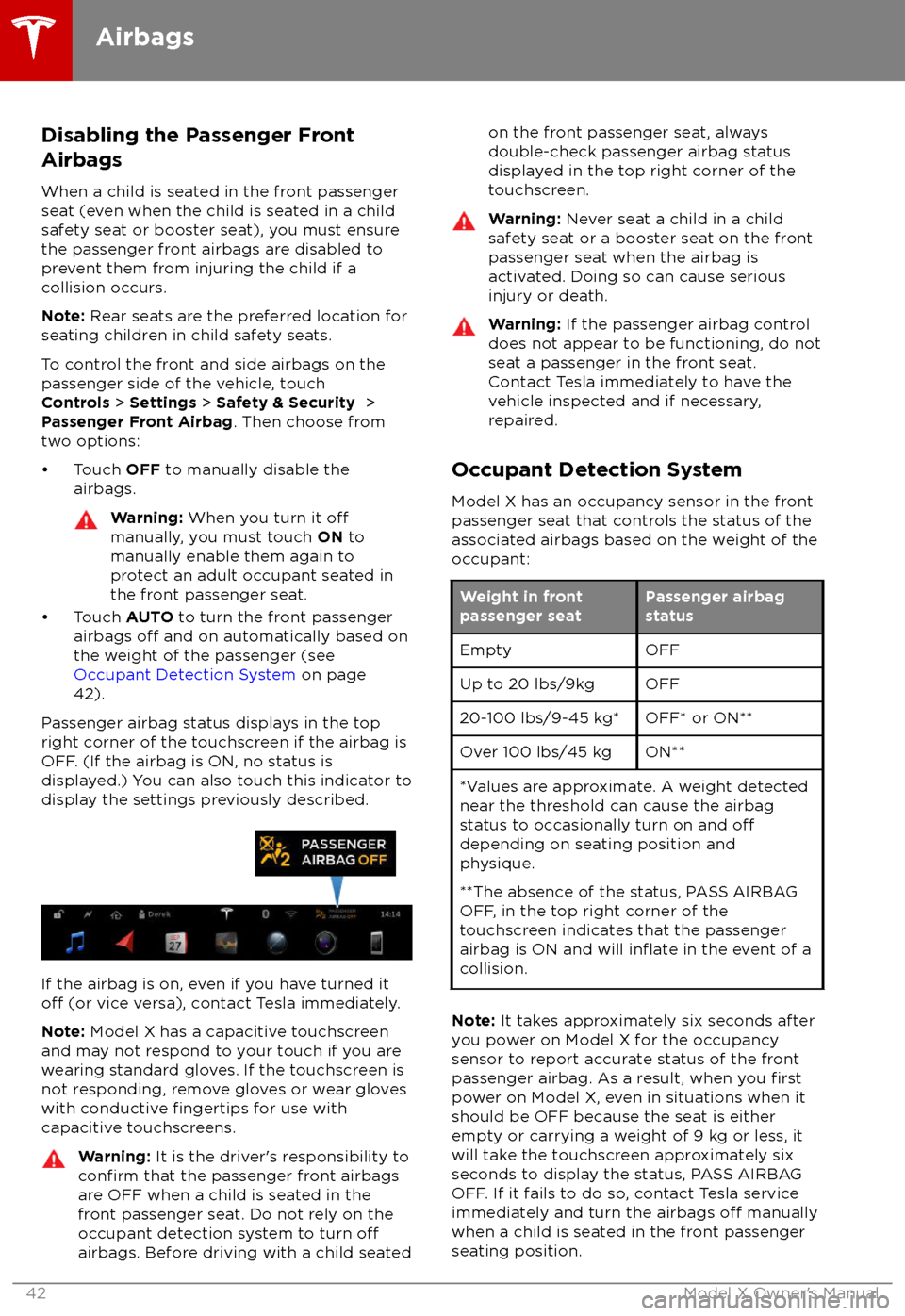
Disabling the Passenger Front
Airbags
When a child is seated in the front passenger
seat (even when the child is seated in a child safety seat or booster seat), you must ensure
the passenger front airbags are disabled to
prevent them from injuring the child if a
collision occurs.
Note: Rear seats are the preferred location for
seating children in child safety seats.
To control the front and side airbags on the
passenger side of the vehicle, touch
Controls > Settings > Safety & Security >
Passenger Front Airbag . Then choose from
two options:
Page 207 of 213

AABS (Anti-lock Braking System) 66
absolute speed limit 112
Acceleration (dual-motor) 119
Acceleration settings 73
access panel, removing 173accessoriesplugging into power socket 137
accessory carrier 80
adaptive headlights 63
air circulation 127
air conditioning 126
air distribution 127
air
filter 131
air suspension 133
air vents 131
airbag, front passenger, disabling 42
airbags 40
alarm 147
all-season tires 166
always connected, setting 76
anti-lock braking (ABS) 66
audioplaying files 134
steering wheel buttons 47
volume control 134
Auto High Beam 63
Auto Lane Change 100
auto-raising suspension 132
automatic emergency braking 109
Autopark 102
Autopilot components 88
Autosteer 97
average range 76
B
backup camera 78
battery (12V)complete discharge 155specifications 185Battery (high voltage)care of 155
coolant 173
specifications 185
temperature limits 155
battery (key), replacing 5
bicycle carrier 80
blind spot warning 106
Bluetoothdevices, playing audio files from 137
general information 139
phone, pairing and using 139
body repairs 176
body touch up 171
brake
fluid replacement 162
brakesbrakes (continued)automatic in emergencies 109fluid level 173
overview of 66
specifications 184
brightness of displays 122
C
Cabin Overheat Protection setting 122
cabin temperature control 126
Calendar app 146
camera (rear view) 78
cameras (autopilot) 88
car cover 171
car status, displaying 47, 48
car washes 169
cargo area 14
cargo volume 182
carpets, cleaning 170
CE
certifications 200
CHAdeMO 154
chains 167
change of ownership 125
charge port 157
charge port light 158
chargingcharge settings 158
components and equipment 153
instructions 157
public charging stations 154
scheduling 158
status of 160
charging locations, finding 142
child protectiondisabling liftgate and rear door handles
10
disabling rear window switches 12child seatsdisabling front passenger airbag 42
installing and using 30
Chill acceleration 73
cleaning 169
climate controls 126
Climate Timer 130
Cold Weather controls 119
collision avoidance assist 108
console12V power socket 137
cup holders 18
USB ports 137
consumption chart 76
contact informationroadside assistance 192coolantBattery, checking level of 173
Battery, replacement interval 162
copyrights 197
Index
206Model X Owner
Page 209 of 213
H
hazard warning
flashers 64
head restraints 25
head supports 25
headlightsadaptive 63
after exit 63
high beams 63
heated wipers 65
heating 126
height adjustments (suspension)auto-raising 132
automatic and manual settings 133
disabling (Jack mode) 133
high beam headlights 63
high voltageBattery specifications 185
components 153
safety 162
hills, stopping on 72
Home location 144
HomeLinkFCC certification 201
programming and using 148
hood 15
horn 49
I IC
certifications 200identification labels 177
Insane acceleration (performance dual motor) 73
Insane setting (dual-motor) 119
instant range 76
instrument panelcharging status 160
cleaning 170
overview of 54interiorcleaning 170
dimensions 181
lights 60
overview 2
temperature control 126
Internet radio 136
intrusion detection 147
ISOFIX child seats, installing 34
J
J1772 154
Jack mode 133
jacking 175
KkeyFCC and IC certifications 200
how to use 4
key not inside 51
ordering extras 7
replacing battery 5
keyless entry 4
L
labelStatutory Plate 179
Tire and Loading Information 179
lane assist 106
lane change flash 64
lane change, automatic 100
lane departure warning 106
Language & Units 122
language setting 122
Launch Mode (performance dual motor) 73
liftgateadjust opening height 14
opening 13
lifting 175
lightsadaptive headlights 63
hazard warning 64
headlights after exit 63
turn signals 63
load limits 178
location-based suspension 132
locking and unlocking doors 4
Ludicrous acceleration (performance dual
motor) 73
Ludicrous setting (dual-motor) 119
lug nut covers 166
lumbar support 20
M
maintenancebrake fluid, checking 173
cleaning 169
daily and monthly checks 162
fluid replacement intervals 162
panel, removing 173
replacing wipers 172
service intervals 162
tires 163
washer
fluid, topping up 174
map updates 145
maps 141
mats 171
Max Battery Power 119
Index
208Model X Owner
Page 210 of 213

Max Battery Power (performance dual motor)73
media 134
mileage upon delivery 198
mirrors 50
mobile app 152Mobile Connectordescription 154
using 157
modifications 176
motor torque, reduced 110
my car does what? 196
N naming 125
navigation 141
NCC
certifications 200
Neutral gear 53
night mode 122
O odometer 75
offset from speed limit 112
overhang dimensions 181
overtake acceleration 91
Owner Information, about 197
P Park Assist 70
Park gear 53
parking brake 67
parking, automatic 102
parts replacement 176
Passive Entry 122
Pedal Misapplication Mitigation 108
personal data, erasing 125
phonesteering wheel buttons 48
using 139
PIN 46
power management 76
power socket 137
power windows 12
powering on and
off 51
Preconditioning 122
preferences, setting 122
public charging stations 154
R radar 88
radio 134
Radio Frequency information
200rangedisplayed on instrument panel 54
driving tips to maximize 76
regenerative braking 66
range assurance 76
Range mode 76
Range Mode 119
Rated range 122
re-routing 143
rear seats, accessing 23
rear view camera 78
rear window switches, disabling 12
Recent (Media Player) 136
Recents 141
regenerative braking 66
region format 122
relative speed limit 112
release notes 151
restarting the touchscreen 51
Reverse gear 53
RFID transponders 176
roadside assistance 192
rotating tires 164
route overview 143
S
safety informationairbags 43
child seats 39
seat belts 29seat beltscleaning 170
in a collision 28
overview of 27
pre-tensioners 28
wearing when pregnant 28
seat covers 26
seat heaters 126
seating capacity 179
seatsadjusting 20
heaters 126
seats, second row 21
security settings 147
sensors 88
service data recording 198
service intervals 162
Settings 122
Settings, erasing 125
shifting gears 53
Show Commute Advice 143
side collision warning 106
slip start 69
Smart Preconditioning 122
software reset 125
software updates 151
Index
Index209
Page 211 of 213

specificationscargo volume 182
dimensions 181
exterior 181
interior 181
motor 184
subsystems 184
tires 186
weights 182
wheels 186
speed assist 112
speed limit warning 112
spoiler 79
Sport acceleration (performance dual motor) 73
stability control 69
Standard acceleration 73
starting 51
Statutory Plate 179
steering
specifications 184
steering wheeladjusting position 47
adjusting sensitivity 47
buttons 47
heated 47
scroll wheels 47
steering, automatic 97
summer tires 166
Summon 102
sun visors 19
superchargingdescribed 161
idle fees 161
pay-per-use fees 161
suspension 133
suspension specifications 185
T
telematics 198
temperatureBattery (high voltage), limits 155
cabin, controls for 126
heated steering wheel 49
outside 54
third row seats, folding and raising 24
tie-down straps 195
tilt detection 147
Tire and Loading Information label 179
tire noise 167
Tire Pressure Monitoring SystemFCC certification 201
overview of 167
tire pressures, checking 163
tire pressures, when towing 81
tiresall-season 166
balancing 164tires (continued)chains 167
inspecting and maintaining 164
pressures, how to check 163
replacing 165
replacing a tire sensor 168
rotation 164
specification 186
summer 166
tire markings 187
winter 166
toll system transponders, attaching 176
tolls, avoiding 143
torque
specifications 184
touch up body 171
touchscreenclean mode 170
cleaning 170
Controls 119
overview 114
Settings 122
software updates 151
tow eye, locating 194
Tow mode 194
towing 194
towing a trailer 81
towing capacity 81
towing instructions 194
Towing Label 178
Towing Mode 81
TPMSFCC certification 201
overview of 167
traction control 69
trademarks 197
Traffic-Aware Cruise Control 91Traffic-Based Routing 143
trailer, towing 81
transmission
specifications 184
transponders, attaching 176
transporting 194
trip chart 76
trip meter 75
trip overview 143
trip planner 143
trunk, front 15
trunk, rearchild protection lock 10
disabling interior handle 10
TuneIn radio 136
turn signals 63
Typical range 122
U ultrasonic sensors 88
Unlock on Park 4
unlocking and locking doors 4
Index
210Model X Owner